

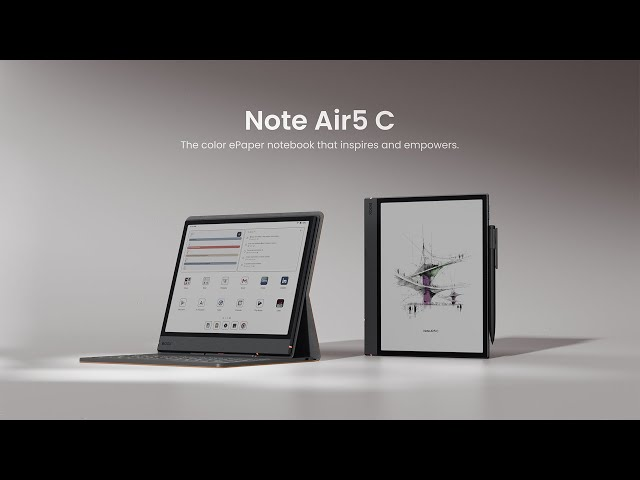
☕ Imagine This…
You’re sitting in a coffee shop, the afternoon sun streaming through the window. Your eyes are tired from staring at bright screens all day. Then you pull out a device that feels like paper, writes like a notebook, but has the power of a tablet. Welcome to the world of the BOOX Note Air 5 C.
If you’ve been searching for a device that combines the comfort of reading on paper with the versatility of modern technology, you’ve found it. Let me show you why this might be exactly what you need.
✨ What Makes the BOOX Note Air 5 C Special?
The BOOX Note Air 5 C isn’t just another tablet. It’s a carefully crafted solution for anyone who spends hours reading, taking notes, or working with documents. Think of it as the perfect middle ground between a traditional e-reader and a full Android tablet—without the eye strain.
Here’s what caught my attention right away: this is one of the first mainstream devices to merge color E-Ink technology with full Android capabilities. That means you get the paper-like reading experience you love, plus access to thousands of apps through the Google Play Store.
Key Features at a Glance
- 📱 10.3″ Color Display
E Ink Kaleido 3 technology for comfortable extended reading - 🤖 Android 15
Full Google Play access for your favorite apps - ✍️ Natural Writing
Pen3 stylus for paper-like note-taking - 🔋 Long Battery Life
Days of use on a single charge
Unboxing: What’s in the Box?
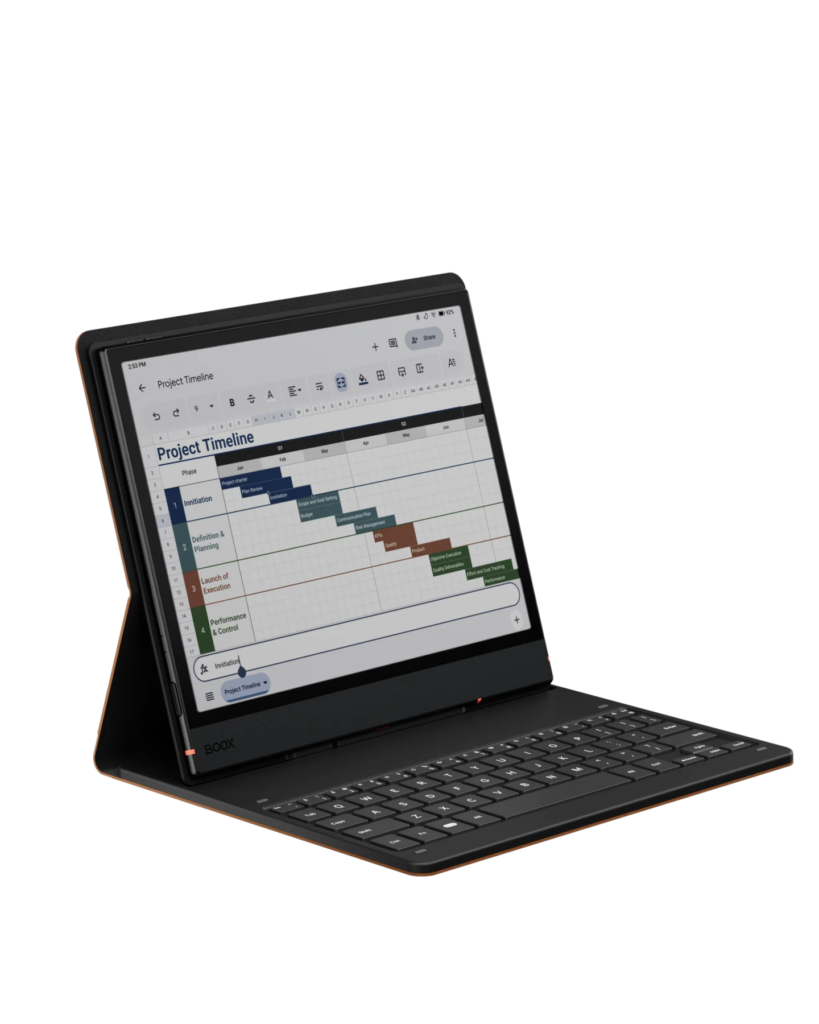
When you order your BOOX Note Air 5 C, here’s what you’ll find waiting for you:
- The BOOX Note Air 5 C tablet – sleek, lightweight, and ready to go
- BOOX Pen3 stylus – pressure-sensitive and incredibly responsive
- USB-C charging cable – because nobody wants proprietary cables anymore
- Quick start guide – though you probably won’t need it
💡 Pro Tip: Consider getting the magnetic case bundle. It adds protection and makes the device feel even more premium. Many users say it’s worth the extra investment for daily use.
🖥️ The Features That Actually Matter
Display & Reading Experience
Let’s talk about what you’re really here for—the display. The 10.3-inch color E Ink Kaleido 3 screen is a game-changer.
- No blue light
- No eye fatigue
- Reads like real paper
The color reproduction is intentionally subdued—think watercolor, not neon lights. This is by design. It’s optimized for comfort, not saturation. Perfect for highlighted text, color-coded notes, and illustrated books.
Real User Insight: One reviewer mentioned reading for 6 hours straight on a long flight without a single moment of eye strain. Try doing that with your smartphone!
Android 15: The Secret Weapon
Here’s where the BOOX Note Air 5 C really pulls ahead. With full Android 15 access, you’re not locked into a single ecosystem.
- Use Kindle, Kobo, Google Books all in one
- Install Notion, Evernote, Reddit, or any productivity tool
- Run multiple apps at once without switching devices
This flexibility transforms it from a reader into a true productivity powerhouse.
Writing Experience: Like Pen on Paper
Let’s be honest—most digital pens fall short. But this one feels just right.
- Textured screen + responsive Pen3 stylus = paper-like friction
- Near-zero lag
- Excellent pressure sensitivity for natural handwriting
Whether you’re sketching, signing PDFs, or writing detailed notes, this stylus won’t let you down.
Real-World Performance: Does It Actually Work?
I compiled feedback from dozens of users across different professions:
🎓 For Students
Medical and law students are loving it:
“I carry hundreds of textbooks, annotate lectures live, and study for 8+ hours—no eye strain. It’s a study lifesaver.”
💼 For Professionals
Lawyers, consultants, managers:
- Replace printed docs
- Annotate files
- Present ideas seamlessly
📖 For Readers & Researchers
Avid readers and academics praise the ability to:
- Highlight in color
- Make margin notes
- Search across multiple books
“I cut my research time by 30%.” — Literature professor
✅ The Honest Truth: Pros & Cons
✅ What You’ll Love:
- ✅ Zero eye strain – Read/work for hours
- ✅ Exceptional writing feel
- ✅ Full Android access
- ✅ Color E-Ink – gentle and functional
- ✅ Expandable storage (MicroSD)
- ✅ Front light – warm/cool adjustable
⚠️ What to Know Before Buying:
- ⚠️ Muted color – Not ideal for media consumption
- ⚠️ Not for videos – Refresh rate limitations
- ⚠️ Premium price – An investment
- ⚠️ Slight learning curve – Best after tweaking settings
📊 How Does It Compare to Other Options?
📈 Comparison Table
| Feature | BOOX Note Air 5 C | Kindle Scribe | reMarkable 2 |
|---|---|---|---|
| Color Display | ✅ Yes | ❌ No | ❌ No |
| Android OS | ✅ Full Android | ❌ No | ❌ No |
| App Support | ✅ Google Play | ❌ Amazon Only | ❌ Limited |
| Writing Feel | ⭐⭐⭐⭐⭐ | ⭐⭐⭐⭐ | ⭐⭐⭐⭐⭐ |
| Best For | Power Users | Amazon Readers | Pure Writing |
🏆 Verdict
If you want maximum flexibility, the BOOX wins.
If you just read Amazon books, Kindle Scribe makes sense.
If you’re a minimalist, reMarkable is beautifully simple.
👉 Most people wanting a full experience should see price on Amazon.
💰 Pricing & Value: Is It Worth It?
Expect to pay €509–€640, depending on your region and bundle.
But ask yourself:
- How much do you spend on books or paper?
- How valuable is your time and eye health?
- How many cheap tablets have failed you?
Most users say the BOOX pays for itself in less than a year.
💡 Current Deals: See price on Amazon – often includes bundles or discounts.
🛠️ Pro Tips to Get the Most from Your Device
🎯 Optimization Tips from Real Users:
- Customize front light (warm/cool)
- Install cloud sync early (Dropbox, Drive)
- Try multiple note apps: OneNote, Nebo, etc.
- Use refresh modes wisely (speed vs quality)
- Add a keyboard case for writing
- Organize your files early
❓ Frequently Asked Questions
Q: Can I install any Android app?
A: Yes. Just avoid video apps, as E-Ink isn’t made for fast refresh.
Q: How long does the battery last?
A: Average 5–7 days of typical use.
Q: Is color worth it?
A: For students and note-takers, yes. For just reading novels, maybe not.
Q: Is PDF annotation good?
A: Excellent. Many use it specifically for this.
Q: Does it recognize handwriting?
A: Yes. Plus you can search your handwritten notes.
Q: Better than an iPad?
A: If you prioritize eye comfort and focus, definitely.
Q: Can I use it outside?
A: Yes. Sunlight improves visibility, unlike traditional screens.
Q: What’s the return policy?
A: Standard Amazon return + manufacturer warranty. See here.
✅ Final Verdict: Should You Buy It?
🏆 The BOOX Note Air 5 C is one of the most versatile E-Ink devices ever made.
Perfect if you:
- Spend 3+ hours/day reading or working with documents
- Suffer from screen fatigue
- Want app flexibility + great handwriting
- Need distraction-free productivity
👉 Get your BOOX Note Air 5 C on Amazon
🔄 Alternatives Worth Considering
📚 Kindle Scribe
Great for Amazon readers.
👉 Compare Prices
✍️ reMarkable 2
Best pure writing experience.
👉 Check Availability
🖥️ BOOX Note Max
For users needing more screen real estate.
👉 View on Amazon
💼 Supernote A5 X2
Durable and built for long-term note storage.
👉 Learn More
📘 Ready to Make the Switch?
Thousands of users say they can’t go back to traditional screens after trying BOOX.
Whether you’re a:
- Student buried in textbooks
- Professional juggling reports
- Reader wanting comfort and clarity
The BOOX Note Air 5 C is a smart, long-term solution.
🎁 Pro Tip: Amazon sometimes includes bundles with accessories. Check the current offer here
Have questions? Leave a comment below—I answer them all!
👉 Start your E-Ink journey here
Disclosure: This post contains affiliate links. If you purchase through them, I may earn a small commission at no extra cost to you. Thanks for supporting this blog!